Product Design
KITCHEN OPERATIONS DASHBOARD
Designed a scalable internal operations platform to streamline workflow visibility, task tracking, and real-time performance monitoring for operational teams. Focused on building a developer-friendly, component-based system optimized for clarity and data-heavy environments.
Year :
2025
Industry :
Interior & Operations Management
Client :
Confidential (NDA Protected)
Project Duration :
8–10 weeks

🔹 PROBLEM STATEMENT :
Operational teams were managing kitchen workflows across multiple disconnected tools and manual processes. This resulted in:
Poor visibility into daily operations
Delayed task tracking
Inefficient communication between teams
Difficulty monitoring key performance metrics
The product needed a scalable internal platform that could simplify workflows and provide real-time operational clarity.

🔹 SOLUTION :
The Kitchen Operations Dashboard was designed as a centralized, data-driven platform to streamline kitchen workflows, order tracking, and performance monitoring. The focus was on reducing manual effort and enabling real-time operational visibility. The interface prioritizes scanability, clear hierarchy, and quick actions so teams can monitor status, update tasks, and make faster decisions in high-pressure environments.
Key features:
• Real-time operations overview
• Order & task tracking
• Priority-based workflow view
• Quick-action controls
• Readable data tables
• Clear status indicators
• Responsive, component-based design
🔹 RESEARCH & DISCOVERY :
To understand real operational needs, I conducted focused UX discovery with stakeholders and mapped existing kitchen workflows.
Key activities:
• Stakeholder discussions
• Workflow and task mapping
• Competitive dashboard review
• Edge-case identification
Key insights:
• Teams needed at-a-glance operational visibility
• Deep navigation slowed task updates
• Data-heavy screens required strong hierarchy
• Quick actions were critical in time-sensitive environments

🔹 UX STRATEGY :
Based on research insights, I focused on:
Reducing cognitive load
Improving task visibility
Supporting rapid decision-making
Designing for data-heavy workflows
Ensuring developer-friendly structure
🔹 INFORMATION ARCHITECTURE :
I organized the platform into clear, predictable modules:
Dashboard Overview
Order / Task Management
Kitchen Status Monitoring
Reports & Analytics
Settings & Controls
🔹 PRIMARY USER FLOW :
Login → Dashboard → Task View → Status Update → Analytics Review
Key design decisions:
Minimized steps for critical actions
Maintained strong visual hierarchy
Implemented persistent navigation
Introduced quick-action components
🔹 WIREFRAMING :
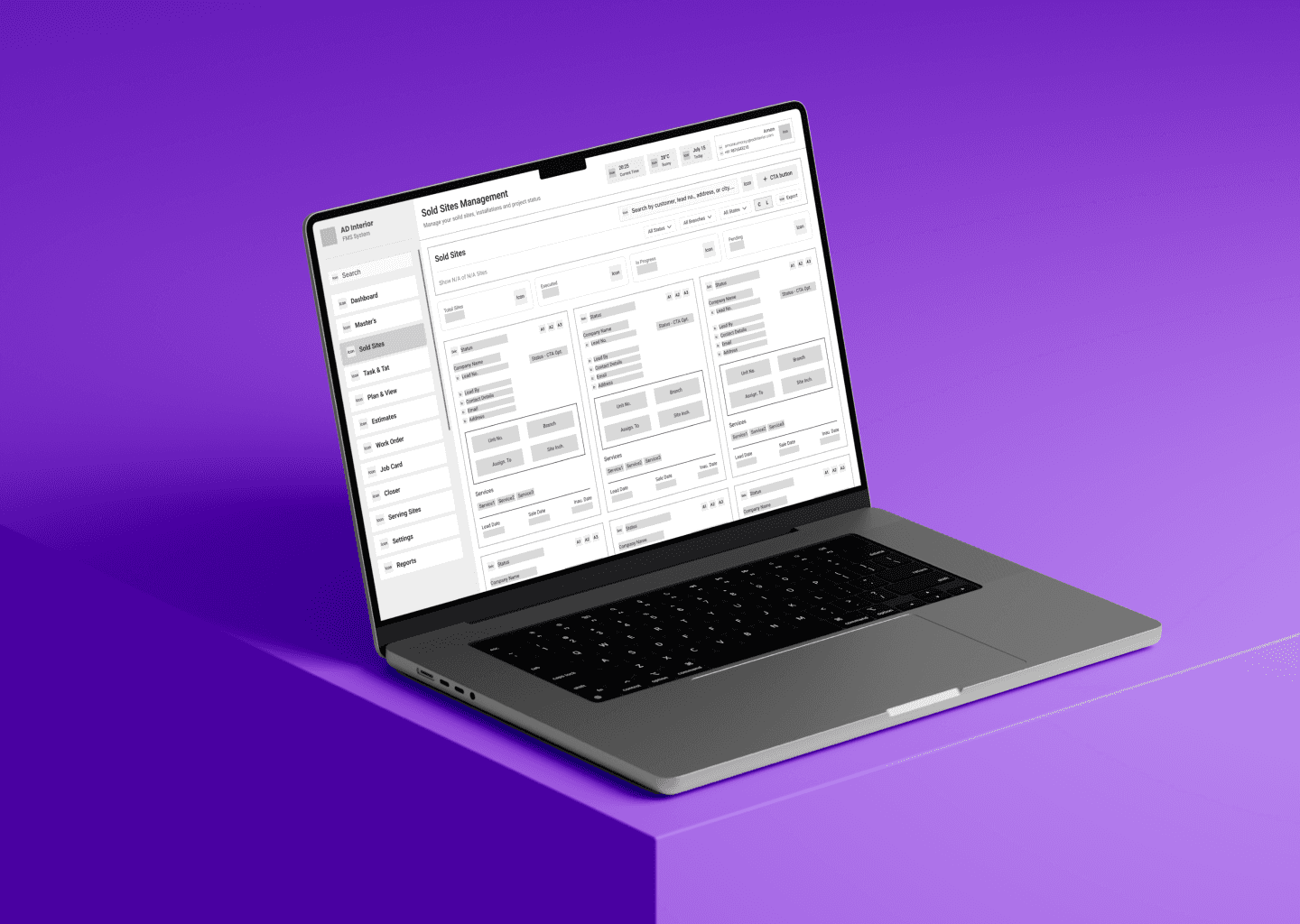
Low-fidelity wireframes were used to validate structure early and helps the stakeholders before moving to high-fidelity UI
Focus areas:
Table readability
Card hierarchy
Filter placement
Responsive behavior

🔹 CHALLENGE :
The primary challenge was to design a data-heavy operations dashboard that enables kitchen teams to monitor workflows, track tasks, and make quick decisions without cognitive overload. The existing process relied on fragmented tools and manual tracking, which reduced visibility and slowed operational efficiency.
Another key difficulty was balancing high information density with clear visual hierarchy. The interface needed to remain highly scannable while supporting complex workflows and real-time status updates. Ensuring consistency across components and preparing designs that translate accurately to development were also critical considerations.
🔹 SUMMARY :
The Kitchen Operations Dashboard delivers a structured, scalable interface that centralizes workflow visibility and improves operational clarity for internal teams. By applying strong information architecture, component-based design, and front-end-aware layout logic, the solution simplifies complex data into an intuitive and production-ready experience.
This project highlights my ability to design enterprise-level internal tools that balance usability, scalability, and developer collaboration—ensuring the product is not only visually clean but also practical for real-world implementation and future growth.


More Projects


Product Design
KITCHEN OPERATIONS DASHBOARD
Designed a scalable internal operations platform to streamline workflow visibility, task tracking, and real-time performance monitoring for operational teams. Focused on building a developer-friendly, component-based system optimized for clarity and data-heavy environments.
Year :
2025
Industry :
Interior & Operations Management
Client :
Confidential (NDA Protected)
Project Duration :
8–10 weeks
🔹 PROBLEM STATEMENT :
Operational teams were managing kitchen workflows across multiple disconnected tools and manual processes. This resulted in:
Poor visibility into daily operations
Delayed task tracking
Inefficient communication between teams
Difficulty monitoring key performance metrics
The product needed a scalable internal platform that could simplify workflows and provide real-time operational clarity.
🔹 SOLUTION :
The Kitchen Operations Dashboard was designed as a centralized, data-driven platform to streamline kitchen workflows, order tracking, and performance monitoring. The focus was on reducing manual effort and enabling real-time operational visibility. The interface prioritizes scanability, clear hierarchy, and quick actions so teams can monitor status, update tasks, and make faster decisions in high-pressure environments.
Key features:
• Real-time operations overview
• Order & task tracking
• Priority-based workflow view
• Quick-action controls
• Readable data tables
• Clear status indicators
• Responsive, component-based design
🔹 RESEARCH & DISCOVERY :
To understand real operational needs, I conducted focused UX discovery with stakeholders and mapped existing kitchen workflows.
Key activities:
• Stakeholder discussions
• Workflow and task mapping
• Competitive dashboard review
• Edge-case identification
Key insights:
• Teams needed at-a-glance operational visibility
• Deep navigation slowed task updates
• Data-heavy screens required strong hierarchy
• Quick actions were critical in time-sensitive environments
🔹 UX STRATEGY :
Based on research insights, I focused on:
Reducing cognitive load
Improving task visibility
Supporting rapid decision-making
Designing for data-heavy workflows
Ensuring developer-friendly structure
🔹 INFORMATION ARCHITECTURE :
I organized the platform into clear, predictable modules:
Dashboard Overview
Order / Task Management
Kitchen Status Monitoring
Reports & Analytics
Settings & Controls
🔹 PRIMARY USER FLOW :
Login → Dashboard → Task View → Status Update → Analytics Review
Key design decisions:
Minimized steps for critical actions
Maintained strong visual hierarchy
Implemented persistent navigation
Introduced quick-action components
🔹 WIREFRAMING :
Low-fidelity wireframes were used to validate structure early and helps the stakeholders before moving to high-fidelity UI
Focus areas:
Table readability
Card hierarchy
Filter placement
Responsive behavior
🔹 CHALLENGE :
The primary challenge was to design a data-heavy operations dashboard that enables kitchen teams to monitor workflows, track tasks, and make quick decisions without cognitive overload. The existing process relied on fragmented tools and manual tracking, which reduced visibility and slowed operational efficiency.
Another key difficulty was balancing high information density with clear visual hierarchy. The interface needed to remain highly scannable while supporting complex workflows and real-time status updates. Ensuring consistency across components and preparing designs that translate accurately to development were also critical considerations.
🔹 SUMMARY :
The Kitchen Operations Dashboard delivers a structured, scalable interface that centralizes workflow visibility and improves operational clarity for internal teams. By applying strong information architecture, component-based design, and front-end-aware layout logic, the solution simplifies complex data into an intuitive and production-ready experience.
This project highlights my ability to design enterprise-level internal tools that balance usability, scalability, and developer collaboration—ensuring the product is not only visually clean but also practical for real-world implementation and future growth.
More Projects
Product Design
KITCHEN OPERATIONS DASHBOARD
Designed a scalable internal operations platform to streamline workflow visibility, task tracking, and real-time performance monitoring for operational teams. Focused on building a developer-friendly, component-based system optimized for clarity and data-heavy environments.
Year :
2025
Industry :
Interior & Operations Management
Client :
Confidential (NDA Protected)
Project Duration :
8–10 weeks
🔹 PROBLEM STATEMENT :
Operational teams were managing kitchen workflows across multiple disconnected tools and manual processes. This resulted in:
Poor visibility into daily operations
Delayed task tracking
Inefficient communication between teams
Difficulty monitoring key performance metrics
The product needed a scalable internal platform that could simplify workflows and provide real-time operational clarity.
🔹 SOLUTION :
The Kitchen Operations Dashboard was designed as a centralized, data-driven platform to streamline kitchen workflows, order tracking, and performance monitoring. The focus was on reducing manual effort and enabling real-time operational visibility. The interface prioritizes scanability, clear hierarchy, and quick actions so teams can monitor status, update tasks, and make faster decisions in high-pressure environments.
Key features:
• Real-time operations overview
• Order & task tracking
• Priority-based workflow view
• Quick-action controls
• Readable data tables
• Clear status indicators
• Responsive, component-based design
🔹 RESEARCH & DISCOVERY :
To understand real operational needs, I conducted focused UX discovery with stakeholders and mapped existing kitchen workflows.
Key activities:
• Stakeholder discussions
• Workflow and task mapping
• Competitive dashboard review
• Edge-case identification
Key insights:
• Teams needed at-a-glance operational visibility
• Deep navigation slowed task updates
• Data-heavy screens required strong hierarchy
• Quick actions were critical in time-sensitive environments
🔹 UX STRATEGY :
Based on research insights, I focused on:
Reducing cognitive load
Improving task visibility
Supporting rapid decision-making
Designing for data-heavy workflows
Ensuring developer-friendly structure
🔹 INFORMATION ARCHITECTURE :
I organized the platform into clear, predictable modules:
Dashboard Overview
Order / Task Management
Kitchen Status Monitoring
Reports & Analytics
Settings & Controls
🔹 PRIMARY USER FLOW :
Login → Dashboard → Task View → Status Update → Analytics Review
Key design decisions:
Minimized steps for critical actions
Maintained strong visual hierarchy
Implemented persistent navigation
Introduced quick-action components
🔹 WIREFRAMING :
Low-fidelity wireframes were used to validate structure early and helps the stakeholders before moving to high-fidelity UI
Focus areas:
Table readability
Card hierarchy
Filter placement
Responsive behavior
🔹 CHALLENGE :
The primary challenge was to design a data-heavy operations dashboard that enables kitchen teams to monitor workflows, track tasks, and make quick decisions without cognitive overload. The existing process relied on fragmented tools and manual tracking, which reduced visibility and slowed operational efficiency.
Another key difficulty was balancing high information density with clear visual hierarchy. The interface needed to remain highly scannable while supporting complex workflows and real-time status updates. Ensuring consistency across components and preparing designs that translate accurately to development were also critical considerations.
🔹 SUMMARY :
The Kitchen Operations Dashboard delivers a structured, scalable interface that centralizes workflow visibility and improves operational clarity for internal teams. By applying strong information architecture, component-based design, and front-end-aware layout logic, the solution simplifies complex data into an intuitive and production-ready experience.
This project highlights my ability to design enterprise-level internal tools that balance usability, scalability, and developer collaboration—ensuring the product is not only visually clean but also practical for real-world implementation and future growth.